

























What Are Google Ads Assets (Formerly Ad Extensions)?
Google Ads assets, previously known as ad extensions, add useful information and additional ways for potential customers to interact with an advertisement. Depending on the campaign, these assets can include extra website links, phone numbers, prices, promotions, locations, images and app links.
Assets can make Search ads more prominent and help users take relevant actions directly from an advert. Google recommends using all asset types that are relevant to your advertising goals rather than relying on a single type.
To manage them in the current Google Ads interface, go to Campaigns > Assets. From there, advertisers can review existing assets or use the + option to create eligible asset types.
List of Ad Extensions in Google Ads
Sitelink Extension
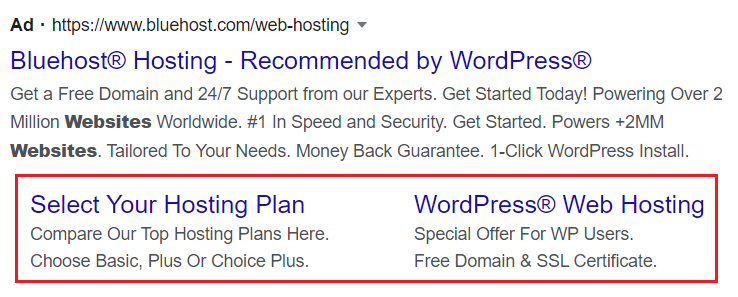
Sitelink assets add additional links beneath or alongside an ad, helping users reach specific pages such as contact pages, product categories, opening hours or service pages without first visiting the main landing page.
Google currently recommends adding at least four sitelinks to make them more likely to appear. Advertisers can update their link text and URLs without having to recreate the main ad. Google decides when eligible sitelinks appear based on factors such as relevance, performance and Ad Rank.
Call-out Extension
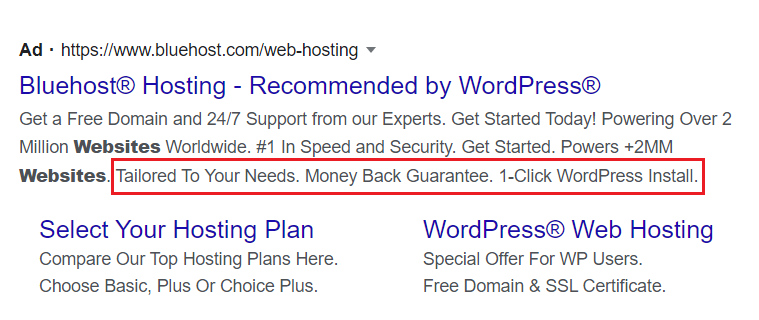
Callout assets provide short pieces of non-clickable text that highlight important business benefits, such as “Free Delivery”, “24/7 Support” or “New Customer Discount”.
Unlike sitelinks, callouts do not direct users to another page. Google recommends adding at least four callouts, giving its system several relevant messages to choose from when displaying an ad.
Structured Snippet Extension
Structured snippet assets highlight particular aspects of products or services using a predefined header followed by a list of relevant values. For example, an advertiser could use a “Types” or “Services” header followed by appropriate offerings.
Structured snippets appear with Search ads and are not clickable. They can be created at account, campaign or ad-group level depending on how broadly the information applies.
Call Extension
Call assets add a business phone number or call button to eligible advertisements, making it easier for potential customers to contact the business directly.
This section is particularly important to update in 2026. Google removed the ability to create new call-only ads in February 2026 and recommends responsive search ads with call assets instead. Existing call-only ads are scheduled to stop receiving impressions in February 2027.
Businesses can also schedule supported assets so that calls are encouraged during times when staff are available to answer them.
Message Assets
Message assets should no longer be described as simply part of the call extension. Google currently provides message assets that allow potential customers to begin a conversation with a business directly from an eligible ad.
Message assets can be used with Search and Performance Max campaigns and can serve on Android and iOS devices. When the message button is selected, the customer can begin a conversation rather than being directed solely to the advertiser’s website.
Location Extension
Google now handles the former Location Extensions and Affiliate Location Extensions under location assets.
Businesses that own their locations can connect location information so advertisements may display details such as their address, distance, directions, opening information or a call button. Businesses that sell through stores they do not own can also use location assets to direct customers towards participating retailers.
Location information can be sourced through services such as Google Business Profile and Google Maps, depending on the type of location setup.
Affiliate Location Extension
This is the same as the Location Extension, but this Affiliate Location Extension can be used if you have offices in different locations. This will list your Ad according to the user location, and they can see the locations of your office. This will help the user to visit your office near their location.
Price Extension
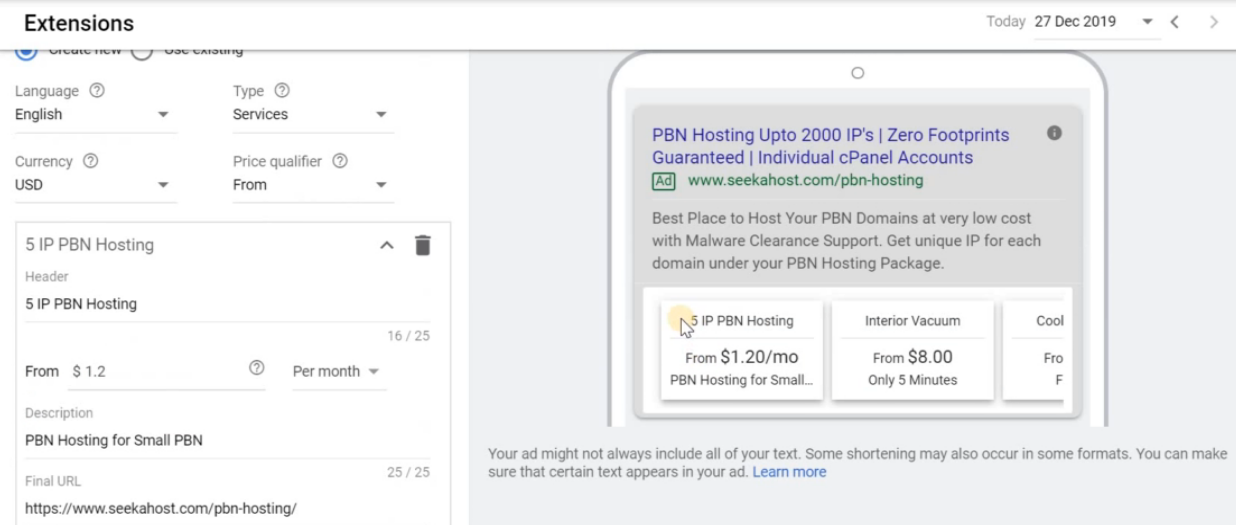
Price assets allow advertisers to display products or services together with their prices directly beneath eligible Search ads. Users can select an individual item and go directly to the relevant page on the advertiser’s website.
A price asset requires at least three items, while Google recommends providing five or more where appropriate. Price assets can display as a set of up to eight cards and can be configured with information including the item header, price, description and final URL.
App Extension
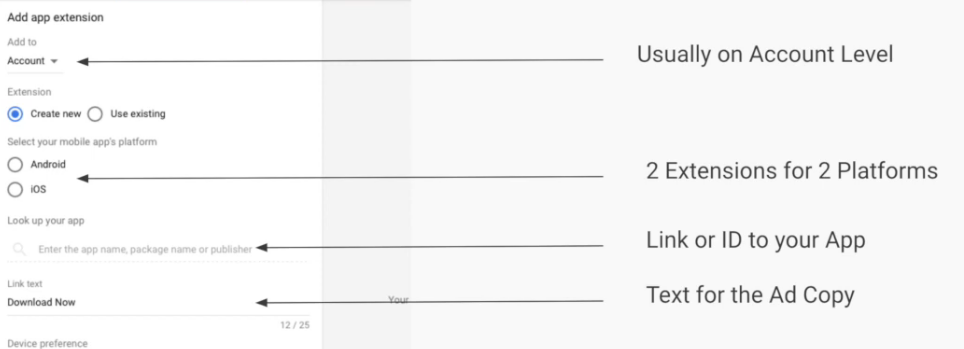
App assets provide a link to an advertiser’s mobile or tablet application from a Search ad. The main ad headline can still take visitors to the website, while the app asset directs users towards the relevant app-store listing.
As of the current Google Ads guidance, app assets are available only for Search ads. The app must already be available through Google Play or Apple’s App Store before an app asset can be configured.
Promotion Extension
Promotion assets highlight sales, discounts and special offers and can include details such as a monetary or percentage discount, product or service name, promotion code, spending requirement and final URL.
Advertisers can schedule promotions around relevant dates, days and times. Promotion assets can currently appear with Search ads and in supported YouTube formats, while certain Performance Max campaigns can also use them for local promotions.
Google Ads now provides additional asset options beyond those covered in the original article. Depending on the campaign and advertising objective, these can include image assets, lead form assets and text disclaimer assets alongside sitelinks, callouts, structured snippets, prices, calls, locations and promotions.
Conclusion
Google Ads extensions have evolved considerably and are now primarily referred to as assets. Although familiar options such as sitelinks, callouts, structured snippets, call, price, app and promotion features remain available, their setup and functionality have changed.
Advertisers should choose assets according to their campaign goals and provide several relevant asset types where possible.
Google then determines which eligible assets and combinations are most useful for a particular search or user. Keeping assets accurate, relevant and regularly reviewed can provide potential customers with more useful ways to interact with an advertisement.
FAQs
1. What Are Ad Extensions Called in Google Ads Now?
Google primarily calls them assets. The older term “ad extensions” is still commonly searched, but current Google Ads documentation uses “assets”.
2. Are Google Ads Assets Free?
There is no separate fee for adding assets. Normal advertising charges can apply when users click or interact with eligible assets.
3. How Many Sitelink Assets Should I Add?
Google recommends adding at least four sitelinks to increase the likelihood of them appearing with your ads.
4. Are Structured Snippet Assets Clickable?
No. Structured snippets provide additional information through a predefined header and list of values, but the snippet itself is not clickable.
5. Can Google Ads Still Display a Phone Number?
Yes. Call assets can add a phone number or call button to eligible ads, particularly responsive search ads.
6. Are Affiliate Location Extensions Still Available?
The functionality remains, but Google now covers both former Location Extensions and Affiliate Location Extensions through location assets.
7. What Other Google Ads Assets Are Available?
Depending on the campaign, advertisers may use sitelinks, callouts, structured snippets, calls, locations, prices, promotions, apps, images, lead forms and other supported assets.