























Link building remains an important part of off-page SEO, but earning useful backlinks increasingly depends on creating resources that other websites genuinely want to reference.
Original images, charts, infographics, maps and data visualisations can work particularly well because publishers can embed them while crediting the original source.
Images can also contribute to search visibility beyond backlinks. Google recommends making images discoverable, placing them on relevant pages, using descriptive filenames and alt text, and optimising them for both quality and loading speed.
For website owners who create original visuals, image link building generally involves three opportunities: reclaiming links that point directly to image files, finding authorised or unauthorised image uses that lack appropriate attribution, and creating new visual assets designed to earn editorial coverage.
Below are three practical ways to build links with images in 2026.
How Do Images Attract Links?
 Original images can become linkable assets because publishers, journalists and bloggers may embed them when explaining a topic.
Charts, research graphics, maps and photographs are especially useful when they communicate information more efficiently than text alone.
When another publisher uses an original image with permission, they may credit its creator by linking to the original article or source page.
However, a backlink is not automatically created every time an image is embedded, so website owners should periodically check how their visual assets are being referenced.
Image optimisation also improves the chances of images being understood and discovered through Google Search. Google recommends relevant surrounding content, descriptive filenames, useful alt text, high-quality images and technically accessible image URLs.
What type of Images can Attract Links?
Not all images can attract links and audiences. In the digital world, you need to provide what the users need. Some of the most attractive images in the digital marketing platform are,
- Infographic
- Graphs
- Photos
- Maps
- Product Photos
These are the images that can attract links naturally, and images like infographics and graphs should be informative and attractive to gain more visitors.
Original photographs, charts and product images can also become valuable linkable assets. If you own the relevant rights, you can monitor how they are being reused and request appropriate attribution where suitable.
3 Ways to Build Link with Images
- Claim links from improper attributions
- Claim links from unauthorized use
- Use the TRUST formula
1. Claim Links from Improper Attributions
One common image-link opportunity occurs when another website credits your image but links directly to the image file, such as a .jpg, .png or .webp, rather than the page where the original visual and supporting information appear.
In these situations, you can politely ask the publisher to change the attribution link so that it points to the original source page.
Ahrefs continues to recommend identifying direct image backlinks because linking to the original page can make the attribution more useful to readers and the publisher.
Importantly, attribution alone does not automatically give somebody permission to use a copyrighted image. In the UK, copyrighted material generally requires permission, an appropriate licence or a relevant copyright exception.
Also remove the claim that attribution links “should be nofollow.” Google says ordinary editorial links do not require a rel attribute.
nofollow is mainly appropriate when a site does not want to associate itself with a destination, while paid links should normally use rel="sponsored" or nofollow.
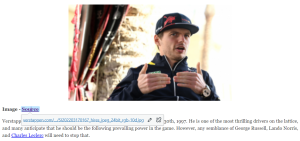
Here is an image of ‘Max Verstappen’, which have used in one of our blogging websites, here we have given the source of the image to prevent copyrights issues.
How to Find Improper Image Attributions?
Ahrefs Site Explorer can still be used to identify websites linking directly to image files.
Enter your domain into Site Explorer, open the Backlinks report and search the Target URL for common image extensions such as .png or .jpg. Ahrefs currently recommends this approach for finding backlinks that point directly to unique images instead of their original pages.
Review each result manually before contacting the publisher. Check:
- Whether Your Original Image Is Actually Being Used
- Where The Existing Link Points
- Whether The Page Is Relevant And Legitimate
- Whether Changing The Link Would Give Readers A Better Source
If the current attribution links directly to an image file, contact the publisher and politely suggest linking to the original article or research page instead.
Monitor New Image Backlinks
You can also use Ahrefs Backlink Alerts to monitor new links pointing to a domain, subdomain, folder or URL. Current Ahrefs documentation confirms that backlink alerts can track new and lost links and send email notifications according to the available alert settings.
For WordPress websites, monitoring a path such as /wp-content/uploads/ can help identify direct links to uploaded images. Other CMS platforms and CDN configurations use different image locations, so monitor the URL path where your site’s images are actually hosted.
2. Find Uncredited or Unauthorised Uses of Your Images
Another opportunity is finding websites that use an image you created without providing attribution. Before contacting the publisher, confirm that you own or control the necessary rights to the image and check whether the site’s use is authorised by a licence or applicable copyright exception.
Under UK guidance, photographs, illustrations and other images are generally protected by copyright, and permission will usually be required to reproduce or publish them online unless a licence or legal exception applies.
Find Where Your Image Is Being Used?
Google’s current visual-search system is Google Lens. On desktop, you can upload an image, drag and drop one into Google Search, paste an image URL, or use Lens directly from supported browsers. Results can include websites containing the same or similar image.
For each match, check whether:
- The Image Is Actually Yours
- The Website Has Permission Or A Valid Licence
- Attribution Is Required Under That Licence
- A Link To Your Original Source Is Missing
- The Website Is Relevant Enough To Contact
Request Appropriate Attribution
If the publisher is entitled to use the image but has omitted attribution required by the licence, contact them and provide the correct creator name, source URL and licensing information.
If the use appears unauthorised, do not assume that receiving a backlink automatically resolves the copyright issue. Depending on your rights and objectives, you may instead request removal, licensing or another appropriate resolution.
Monitor Images Automatically
Remove the existing recommendation specifically promoting Image Raider.
For ongoing monitoring, you can use a current image-tracking service alongside Google Lens. For example, Pixsy currently provides reverse-image monitoring and alerts when matching uses of uploaded images are detected.
Google also supports image licensing metadata, including structured data and IPTC metadata, which can provide creator, credit and licence information in Google Images.
3. How to Use the TRUST Formula in 2026?
 The TRUST framework remains a useful way to think about visual link-building campaigns, particularly when the image communicates original information rather than simply decorating an article.
Find Relevant or Trending Topics
Look for subjects attracting attention within your industry using Google Search, Google Trends, industry publications, social discussions and your own keyword or audience data.
Do not create a visual simply because a subject is trending. Choose topics that are relevant to your website and where original information or visualisation could genuinely improve existing coverage.
Research and Analyse the Topic
Collect trustworthy information from original research, official statistics, public datasets, surveys or your own first-party data.
The stronger the underlying research, the easier it becomes for journalists and publishers to reference the visual as a source.
Find a Unique Takeaway?
Identify the most interesting conclusion in the data.
This might be:
- An Unexpected Trend
- A Regional Difference
- A Significant Increase Or Decline
- A Comparison Between Industries
- A Finding That Challenges A Common Assumption
Your visual should communicate that takeaway quickly.
Create a Simple Visual
Turn the strongest finding into an infographic, map, graph, chart or other visual that can be understood without excessive explanation.
Google recommends using high-quality images, relevant surrounding text and descriptive alt text while also keeping image performance and loading speed in mind.
If you want people to reuse an image, consider publishing clear licensing and attribution instructions. Google also allows publishers to provide image licence and creator information through structured data or IPTC metadata.
Promote the Visual Strategically
After publishing the visual, identify publishers that have previously covered the subject and show them why your data or visual adds something useful to their existing coverage.
Promotion can include relevant journalist outreach, industry publications, newsletters and social media. Focus on earning editorial references because the visual genuinely improves the publisher’s content rather than attempting to manufacture links purely to influence rankings.
Google’s spam policies warn against link-building practices primarily designed to manipulate ranking signals.
Conclusion
Image link building can still be an effective off-page SEO strategy in 2026, particularly when you create original visuals that publishers genuinely want to reference.
The three core approaches remain useful: reclaim links that point directly to image files, identify legitimate opportunities for missing attribution, and create original visual assets using frameworks such as TRUST.
However, image link building should not be treated purely as a way to manufacture backlinks. Protect your copyright, provide clear licensing information, optimise images for search and accessibility, and concentrate on creating charts, maps, photographs and infographics that offer genuine editorial value.
When those fundamentals are in place, a single useful visual can continue attracting mentions, referral traffic and backlinks long after it is first published.
Frequently Asked Questions
1. Can Images Help Build Backlinks?
Yes. Original charts, infographics, photographs, maps and other useful visuals can attract editorial links when other publishers reference or embed them.
2. Does Image SEO Directly Improve Google Rankings?
Image optimisation helps Google discover and understand images and can improve visibility in Google Search and Images, but it should not be described as a standalone ranking algorithm.
3. Should Image Attribution Links Be Nofollow?
Not automatically. Google says normal editorial links do not require a rel attribute, while sponsored links should normally be identified with sponsored or nofollow.
4. Does Giving Credit Make It Legal to Use Any Online Image?
No. In the UK, you will generally need permission, an appropriate licence or a valid copyright exception to reproduce somebody else’s protected image.
5. How Can I Find Websites Using My Images?
Google Lens can search using an uploaded image or image URL and can identify websites containing the same or similar images.
6. Can Ahrefs Find Backlinks Pointing Directly to Images?
Yes. Ahrefs recommends searching the Backlinks report for image extensions such as .PNG and .JPG in the Target URL to locate direct image backlinks.
7. Does the TRUST Formula Still Work for Image Link Building?
The underlying approach remains relevant: find a suitable topic, research it, uncover an interesting takeaway, turn it into a simple visual and promote it to relevant publishers.