

























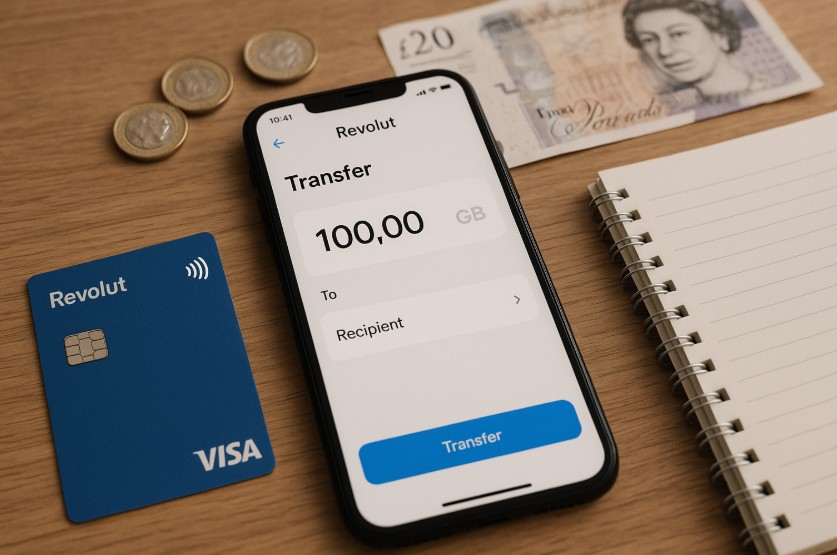
Managing money through Revolut has become common for millions of UK customers, whether they use it for everyday spending, receiving payments or moving money between accounts.
Transferring money from Revolut to a UK bank account is generally straightforward, with GBP transfers within the UK carrying no Revolut transfer fee.
Following the launch of Revolut Bank UK Ltd in March 2026, eligible UK customers are also being moved from e-money accounts to fully regulated current accounts.
This guide covers the current transfer process, fees, processing times, transfer limits and what to do when a payment is delayed or fails.
What Is Revolut and How Does It Work for UK Users?

Revolut is a digital-first financial platform offering current accounts, debit cards, payments, currency exchange, savings and other financial services through its app.
A major change occurred in March 2026 when Revolut Bank UK Ltd became a fully licensed UK bank regulated by the Prudential Regulation Authority and Financial Conduct Authority.
Revolut has been automatically transitioning eligible UK customers from its previous e-money accounts to Revolut Bank current accounts.
Once an eligible account has moved to Revolut Bank UK Ltd, qualifying deposits are protected by the Financial Services Compensation Scheme up to £120,000 per eligible person. Customers can check which Revolut entity provides their account from their account details in the app.
How Can You Link Your UK Bank Account to Revolut?
To transfer money from Revolut to a bank account, the first step is to link the bank account as a recipient. This process only needs to be completed once for each account.
To link a bank account within the UK, the required details typically include:
- The recipient’s full name
- Sort code
- Account number
For international transfers, additional information is necessary, such as the IBAN and SWIFT/BIC codes.
The linking process is done entirely within the Revolut app. Once in the Payments or Transfers section, users can tap the option to add a new recipient.
After entering the details, the account can be saved for future transfers. The app may request verification or confirmation depending on the amount being transferred or the nature of the recipient account.
How Do You Transfer Money from Revolut to Your Bank Account?

Transferring money from your Revolut account to a linked bank account is a straightforward process, designed for ease of use through the mobile app. Once a recipient account is added, funds can be moved in just a few taps.
How to Initiate a Bank Transfer from Revolut?
To transfer money from Revolut to your own UK bank account or another person’s account:
- Open Revolut and select Payments from the bottom menu
- Tap the plus button in the top-right corner
- Choose Bank or International, depending on the transfer
- Select an existing recipient or enter the new recipient’s bank details
- Enter the amount and select the appropriate currency
- Add a payment reference if required
- Review the recipient, estimated arrival time and any applicable fees
- Confirm the transfer
Once sent, the transfer can be opened from the transaction history to check its status and estimated arrival date.
What Account Details Are Required?
For domestic UK transfers, Revolut requires standard bank account details:
- Full name of the recipient
- Sort code
- Account number
For international transfers, the user will need:
- IBAN (International Bank Account Number)
- SWIFT/BIC code
- Recipient’s bank name and country
Entering correct information is critical to ensure the money reaches the intended recipient without delays.
How to Track Transfer Status in the App?
After a payment is sent, users can track its progress in real time. The Revolut app displays the current status whether it is processing, sent, or completed.
If a transfer is taking longer than expected, the app often provides an estimated arrival time based on the recipient’s bank and destination country. Any issues that arise are usually flagged within this status panel.
Are There Any Fees or Limits for Transferring Money from Revolut?
Fees depend on the type of transfer, the user’s account plan, and whether a currency exchange is involved. Domestic transfers in GBP within the UK are usually free. However, other types of transfers may incur charges or exchange rate markups.
The table below outlines typical fee structures and limits:
| Transfer Or Exchange | Current Revolut Charge |
|---|---|
| UK GBP Bank Transfer | No Revolut transfer fee |
| EUR SEPA Transfer | No Revolut transfer fee |
| Transfer Outside UK/SEPA | Fee may apply and is shown before sending |
| Standard FX Allowance | 1% fee above £1,000 per rolling month |
| Plus FX Allowance | 0.5% fee above £3,000 per rolling month |
| Premium, Metal And Ultra FX | No additional fair usage exchange fee |
| Standard Weekend Exchange | 1% |
| Plus Weekend Exchange | 0.5% |
| Premium, Metal And Ultra Weekend Exchange | No additional weekend exchange fee |
For international transfers outside the UK and SEPA region, Revolut may charge a transfer fee.
Premium customers receive a 20% international transfer fee discount, Metal customers 40%, while Ultra customers receive a 100% discount on Revolut international transfer fees. Intermediary or receiving banks may still impose their own charges.
How Long Does a Revolut Bank Transfer Take in the UK?
For UK GBP transfers, Revolut normally uses Faster Payments where available. Faster Payments can arrive within a few hours, although Revolut advises that they may take up to one business day.
Current general transfer timeframes include:
- Faster Payments: A few hours, potentially up to one business day
- CHAPS: Up to one business day
- BACS salary payments: Around two to three business days
- SEPA Instant: Usually within a few minutes
- Regular SEPA: Up to two business days
- International SWIFT: Up to two business days
The exact estimated arrival time is shown in the Revolut app before a transfer is confirmed and can be checked again from the transaction history.
What Are the Best Practices for a Secure Transfer?

Sending money, whether to your own account or a third party, requires attention to detail to prevent errors or potential security breaches.
Revolut incorporates several safety mechanisms, but users also have a role in ensuring secure transactions.
Double-Check Recipient Information
One of the most common causes of transfer failure or delays is incorrect recipient information.
Users should verify:
- Spelling of the recipient’s name
- Accuracy of the sort code and account number (or IBAN/SWIFT for international transfers)
- Correct currency selection for the destination account
A mismatch in any of these fields can result in funds being returned or, in rare cases, lost.
Be Cautious with Currency Conversions
If sending money to an account that uses a different currency from the one held in Revolut, ensure the correct currency is selected before initiating the transfer.
Revolut allows users to exchange currencies within the app, but doing so at the wrong time particularly on weekends may result in higher fees.
The platform applies a markup of 0.5% to 2% during weekends and outside of regular market hours. Users on the free plan should also be aware of the monthly fair usage limit for fee-free currency exchanges.
Use Trusted Networks and Devices
When accessing the Revolut app to send funds, always use a secure internet connection. Avoid transferring money on public Wi-Fi or shared devices. Ensure that app permissions and security settings such as biometric logins or two-factor authentication are enabled.
Understand Revolut’s Transfer Policies
Revolut may place additional checks on large transfers or transfers to new recipients, especially if they involve foreign currencies or high-risk jurisdictions.
These checks may include:
- Verification of account identity
- Delays for compliance review
- Temporary holds on funds
Users should consult their plan limits and read Revolut’s terms to understand when these measures might be applied.
Save and Reuse Trusted Recipients
To reduce the chances of manual entry errors, Revolut allows users to save recipient details after the first successful transfer. Reusing these saved profiles makes future transfers quicker and less prone to mistakes.
Can You Transfer Money from Revolut to Someone Else’s Bank Account?
Yes, it is possible to send money from Revolut to another person’s bank account, provided that the sender has the correct details. The recipient does not need to have a Revolut account. The process is the same as transferring to your own account.
Revolut permits third-party transfers within the app, but there are limits to how much can be sent depending on the user’s verification status and subscription tier.
Sending money to someone else’s account should only be done if the sender is confident in the accuracy of the recipient’s banking information.
What Should You Do If a Revolut Transfer Is Delayed?
A transfer can be delayed because of security or compliance checks, incorrect recipient details, unsupported payment routes, weekends or bank holidays, or additional information being required.
Open the affected transaction in Revolut to check its current status and estimated arrival date. A pending transfer can remain pending for up to 24 hours, although many are completed within a few hours.
If Revolut requires additional information, follow the prompts shown in the app. If a transfer fails or is reverted, check the transaction for the stated reason before sending it again. Revolut also provides specialised transfer support through the affected transaction and its in-app support service.
Is It Possible to Automate Transfers from Revolut to Your Bank Account?
Users who want to automate recurring transfers from their Revolut account can use the scheduled payments feature. This is especially useful for regular savings, paying rent, or sending money to family.
To set up a recurring transfer:
- Go to the Payments tab in the app
- Select the desired recipient
- Tap the Schedule or Repeat option
- Set the amount, frequency, and start date
- Confirm the setup
Automated transfers can be edited or cancelled at any time. The app sends notifications before each scheduled transaction, allowing users to ensure sufficient funds are available.
This feature provides flexibility and helps maintain regular financial routines without manual input.
How Does Revolut Compare with Other Transfer Services Like Wise?
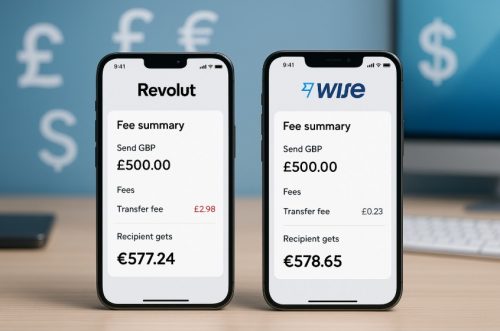
When evaluating Revolut alongside dedicated money transfer platforms, it is important to consider both cost and convenience. Wise, for instance, is widely recognised for its transparent international transfer pricing and real-time exchange rates.
The comparison below highlights the differences in key features:
| Feature | Revolut | Wise |
| Domestic Transfers (UK) | Free, usually instant | Free, usually instant |
| International Transfers | Variable fees | Transparent fixed fees |
| Currency Conversion | Free up to a limit | Real-time mid-market rate |
| Weekend FX Fees | Yes (0.5%–2%) | No weekend markup |
| Multi-Currency Wallet | Yes | Yes |
| Automation/Recurring Transfers | Available | Available |
Both platforms support mobile apps, fast transfers, and multi-currency accounts. Revolut is better suited for users who already bank with the app and want to manage all finances in one place. Wise may be the better choice for those who frequently send money abroad and want complete clarity on fees.
Conclusion
Transferring money from Revolut to a UK bank account remains simple, with GBP transfers within the UK carrying no Revolut transfer fee and Faster Payments commonly providing quick delivery.
The biggest change for UK customers in 2026 is Revolut’s launch as a fully licensed UK bank. Eligible customers are being moved to Revolut Bank UK Ltd current accounts, where qualifying deposits receive FSCS protection of up to £120,000.
Before sending money, check the recipient details, estimated arrival time and any exchange or international transfer fees displayed in the app. This is particularly important when converting currencies or sending money outside the UK.
FAQs About Transferring Money from Revolut to Bank Accounts
1. Is Revolut a bank in the UK in 2026?
Yes. Revolut Bank UK Ltd became a fully licensed UK bank in March 2026, with eligible customers being transitioned to bank current accounts.
2. Is it free to transfer money from Revolut to a UK bank?
Revolut does not charge a transfer fee for GBP bank transfers sent to accounts within the UK.
3. How long does Revolut take to transfer to a UK bank?
Faster Payments normally take a few hours but can take up to one business day. The app provides a specific estimated arrival time.
4. What is the maximum amount I can transfer from Revolut?
There is no single universal maximum published for every transfer. Revolut shows any minimum or maximum applicable to the specific transaction in the app.
5. Does Revolut charge extra for currency exchange at weekends?
Standard customers currently pay 1% and Plus customers 0.5% on weekend exchanges. Premium, Metal and Ultra customers do not pay an additional weekend exchange fee.
6. Why is my Revolut bank transfer pending?
Security reviews, additional information, bank holidays, incorrect recipient information or payment-network issues can cause delays. Pending transfers may take up to 24 hours.
7. Are Revolut UK accounts protected by the FSCS?
Eligible deposits held after an account has moved to Revolut Bank UK Ltd are protected by the FSCS up to £120,000 per eligible person.